




Tapo Camera Privacy Review
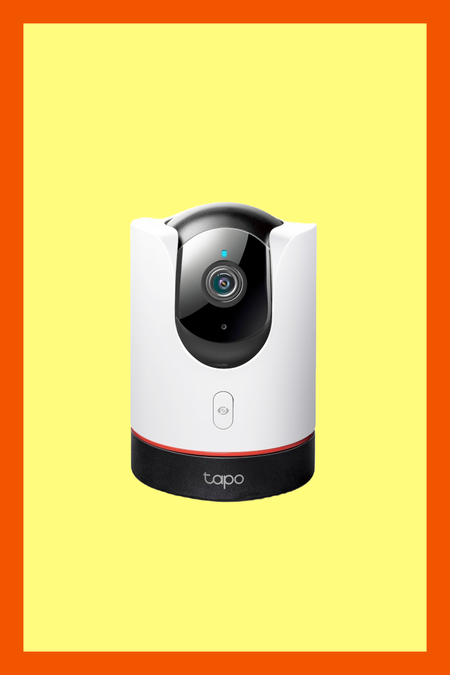
The Tapo C225 is one of TP-Link's AI-enabled home cameras, coming with a wide range of smart home features. It does everything from turning your lights off when you leave the house to sending you an email notification if the water in one of your appliances starts leaking. It is, frankly, a very impressive piece of technology. It also has the potential to be immensely invasive, especially considering TP-Link’s ties to the Chinese government.
5/10
I’m a digital privacy and cybersecurity expert with over half a decade worth of experience reviewing privacy products. My research in academia included speculative execution attacks and AI-based hacking simulations. My privacy work appears in TechRadar, CNET, and ITPro, in addition to a previous stint at ProPrivacy as their in-house technical researcher for VPNs.
O que você deve saber
- Devo confiar nas configurações padrão?
-
On the surface, the C225’s default settings are sensible. Video only appears to be uploaded to TP-Link's cloud service if you sign up for a paid subscription, and only in three minute bursts when a motion or noise trigger you determine beforehand is activated. Without a subscription, video is not stored on their servers and can only be stored locally via a microSD card, which sits beneath the base of the unit and cannot be retrieved without alerting the camera.
It’s worth noting straight away that the only way to set it up is via Bluetooth or Apple HomeKit, so you'll need to download the TP-Link Tapo app to get started. Once you're in, you'll need to register an account with TP-Link. This is non-negotiable; you can't use the app (and thus, the camera) without one.
Our traffic analysis shows that the C225 is constantly phoning home to AWS even if the camera isn’t recording. When we reached out to TP-Link, we were told that these connections are keep-alive traffic allowing “users to manage the camera remotely through the Tapo app outside the local network” and do not contain personal data. When the camera is off, the only network traffic sent out are the DNS requests which tell it which servers to connect to.
At least some of the AI processing used to detect motion and distinguish between people really does take place on the device by selectively blocking internet access to the camera while testing the AI out. However, the Tapo app also allows you to tag footage uploaded to the cloud with events to help train the AI model. It seems as though this metadata is associated with the footage at the cloud level instead of being stored on the device, so we have to question exactly how much access TP-Link really has. Person detection is turned on by default, although vehicle, pet, and most importantly facial detection is turned off.
Facial recognition is turned off by default, which is the right call given how sensitive biometric data is.
- Quais dados pessoais eles têm?
-
When you sign up, TP-Link collects your email address, which is then associated with all your cameras. If you subscribe to TapoCare, TP-Link will also store your video clips on Amazon Web Services.
The privacy policy is worth reading carefully: TP-Link's cloud hosting uses Amazon Web Services pretty extensively. AWS is a reputable and widely used cloud infrastructure provider, which is the good news. The less reassuring news is that this means your camera footage, if uploaded, is passing through a third-party service with its own terms, retention policies, and access controls.
If you opt into the User Experience Improvement Program, TP-Link collects your phone's IMEI number as well as data relating to the device you’re using like system version and product function usage data. All of the standard cutouts for marketing purposes are here too. TP-Link can pass any data they hold to their marketing partners as long as it’s anonymized and aggregated first. That isn’t great, but it is par for the course from any technology provider.
What the privacy policy doesn't clearly answer is whether your stored video clips are accessible only to you, or whether TP-Link employees can also access them. Given that the clips are stored on TP-Link's AWS infrastructure, this is not a trivial question. When asked, TP-Link stated that “In the normal course of business, no TP-Link employee can access video clips. In the rare case of a verified security incident, a small group of US employees at TP-Link's California headquarters may access system logs and metrics necessary to investigate the incident. This process is strictly controlled and requires multi-level approvals from US headquarters leadership.”
- Histórico de avaliação
-
Security researcher Simone Margaritelli discovered that TP-Link’s C200 (slightly different from the C225) model used the same SSL key every single time. Without getting into the technical details, the SSL key is what’s used to encrypt the video stream being sent back to TP-Link’s servers. This means that if a hacker has access to your local network, they’d be able to easily decrypt and view the video stream from your camera.
While TP-Link did release a firmware patch, the slow response time and severity of the flaw are worth bearing in mind.
TP-Link is also under scrutiny by the US government. In response to a series of investigations led by the Departments of Commerce, Defense, and Justice, TP-Link split into two entities in 2024: TP-Link Technologies, based in Shenzhen, and TP-Link Systems, headquartered in Irvine, California.
The US-based entity insists it operates independently and that no foreign government has access to its products' design or data, but that hasn’t stopped the US from exploring banning TP-Link’s products in the US in the past, spurring the decision to completely ban the sale of new foreign-made routers. Texas’ Attorney General Ken Paxton is in the process of suing TP-Link, alleging that the company is a national security threat.
- Este produto vende ou compartilha dados do usuário?
-
TP-Link states that it does not sell your personal data.
Os aspectos positivos e negativos
- Os aspectos positivos
-
The camera can be used as an entirely offline device. Although you'll need to log in for the initial setup, once past the TP-Link configuration the camera can be managed over a local network using RTSP and connected to a NAS or used with a microSD card — all without any cloud connectivity. For users comfortable with local network management, this is a genuinely useful option.
TP-Link's camera also uses local AI models to detect people, pets, and vehicles. These functions work even without network connectivity, suggesting that at least some AI processing takes place on the device itself rather than being sent to the cloud for analysis.
The camera also allows you to create privacy zones. These are areas of your home that may contain sensitive content which are masked with a black bar during recording. Note that this setting resets if the camera is moved or rotated, so you'll need to reconfigure it if the camera is disturbed.
TP-Link states that Tapo uses AES 128-bit encryption and TLS 1.2 protocols to protect data in transit, and that the platform holds ISO 27001 and ISO 27701 certifications for information security and personal information management.
- Os aspectos negativos
-
If you do sign up for TP-Link's TapoCare cloud service, it appears to be impossible to disable the automatic upload of motion-triggered clips to TP-Link's servers without cancelling your subscription entirely. This is a significant design limitation: if you want cloud storage for some clips but not others, or want to pause uploads temporarily, there’s no mechanism to do so.
You can simply choose not to subscribe, in which case the camera does not appear to upload video footage. However, if you're not using TP-Link's cloud service, there's no reason to keep the camera connected to it at all, in which case you may as well run the camera fully offline.
Reduza seus riscos
-
You can keep your camera offline completely by going into your router and blocking the C225 from sending traffic outside your network by blocking the IP using a firewall. It will still function and you’ll be able to manage the camera locally using the Tapo app. If you’re really worried about being spied on, it’s also possible to cut out TP-Link’s ecosystem entirely by using the RTSP protocol built into the camera.
Ideally, you should also keep your IP camera on a completely separate network segment isolated from your main devices. This limits the damage if the camera is ever compromised, preventing an attacker from using it as a foothold into the rest of your home network. Enable two-factor authentication on your Tapo account and keep the camera's firmware updated, paying attention to TP-Link's security advisories.
Conclusão
-
A few issues prevent the Tapo C225 from being a straightforward privacy-friendly solution. Much of TP-Link's design is sensible and broadly in line with what you'd want from a privacy-conscious camera. Local AI processing, offline operation via RTSP, and privacy zones are all genuine positives.
However, the inability to disable cloud uploading while subscribed to TapoCare short of cancelling the subscription entirely is a bizarre design choice. The vulnerability response time on similar Tapo devices is concerning. Worst of all, the broader regulatory scrutiny surrounding TP-Link as a company adds a layer of uncertainty that's difficult to simply set aside when the device in question is recording video inside your home.
If you decide to buy one, run it offline. If you can't run it offline, keep it on a separate network and skip the cloud subscription.